
Production scheduling in Excel
Production scheduling in Excel or planning software?
Excel is a great start, until every rush order means rebuilding the whole plan.
Almost every planner starts in Excel. This page helps you decide when a spreadsheet is enough for production scheduling and capacity planning, and when it costs you more time than it saves.
Why Excel
Excel is not the problem.
It just stops scaling.
Planners choose Excel for good reasons.
Everyone knows it
Every planner can use it, without training or a project.
It is flexible
Add a column or a color for rush orders in seconds.
It costs nothing extra
It is already on every PC.
It starts to pinch when orders, changes and the number of people reading the plan grow.
Spot the signals
Five signals your plan has outgrown Excel
Do they come back every week? Then the spreadsheet works against you.
Every rush order breaks the sheet
One rush order shifts the week, and you rebuild the plan.
The plan lives in one head
When the planner is out, nobody knows which order comes first.
Capacity is a guess
Without the real capacity of each team and machine, you see overload too late.
Status means walking the floor
“Where is that order again?” means the sheet knows less than the shop floor.
ERP and Excel drift apart
Orders typed twice and versions sent by email: nobody knows which plan is right.
Where the time goes
An order is rarely being worked on.
Mostly it waits in line.
In make-to-order production the pattern is almost always the same: an order spends 95% of its lead time waiting and 5% being worked on.
A better spreadsheet does not shorten that queue. Releasing only what can start, and planning on the capacity you really have, does.
What to do on Monday: take one late order and list how long it waited before each operation.
In 24Flow: the Order Pool
Release only what can start
The Order Pool shows every open order with its material availability and the workload it adds per team. Release an order when the materials are in and the team has room. That keeps work in progress under control and orders moving.

In 24Flow: MCT Maps
See where your lead time goes
MCT Maps draws every order from first operation to delivery, straight from the time your operators register. Dark blocks are touch time, white space is waiting. You see at once which queue to attack first.

Excel next to planning software
What changes when you plan on real capacity
Same planner, same orders. The difference is what the tool does for you.
| In Excel | With planning software | |
|---|---|---|
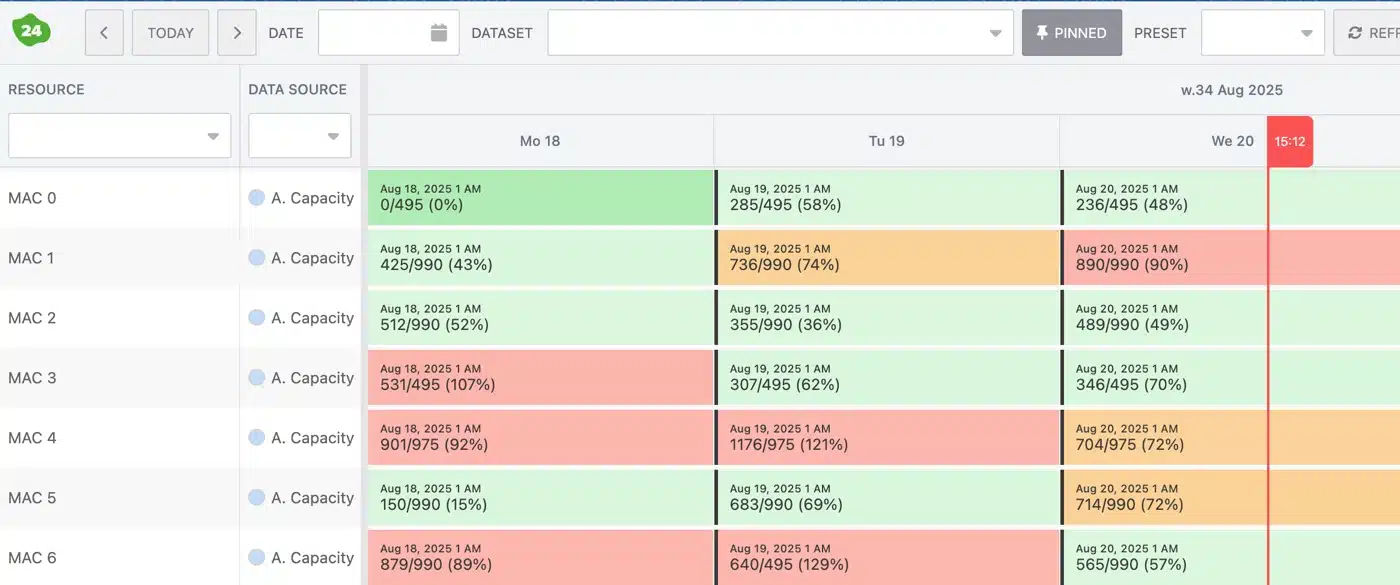
| Capacity | An estimate, filled in by hand each week | Finite capacity per team and machine, with shifts and absences |
| Rush orders | Rebuild the sheet | Drag the order and see the impact before you decide |
| Status | Walk around and ask | Live from the shop floor, from the Team Cockpit at each workstation |
| ERP | Retype or copy and paste orders | Orders and component availability come from your ERP; confirmed plans go back |
| Knowledge | In one planner's head | One shared planning board everyone can read |
24Planning is the planning app of 24Flow, the MES for make-to-order manufacturers. See what it does for your daily planning on production scheduling software for planners.
Proof from the shop floor
Less time planning.
More time working ahead.
Three make-to-order manufacturers on what changed when they planned with 24Flow.
Mariasteen
AI scheduling at scale
“Planning went from 3 hours to 30 minutes. Now we can focus on solving real problems.”
Thomas Van Landeghem, Operations Manager, Mariasteen
Kuyer Metaal
Improving delivery reliability
“Our planning was always behind schedule. With 24Flow, we were finally able to work ahead and catch up on six months of backlog.”
Marcel Koopman, Operations Manager, Kuyer Metaal
CGK Group
Turning QRM into flow
How CGK Group got 30 to 50% less planning admin with 24Flow.
Kuyer Metaal and Mariasteen also feature on production planning software for metal fabrication.
Frequently asked questions
Questions about planning in Excel
Can Excel do capacity planning per machine?
Yes, with formulas and a tab per machine. But the sheet only knows what you type. Every breakdown, absence or moved order has to be entered by hand, so the plan soon lags behind the shop floor.
When is planning software worth it?
When the signals on this page come back every week. If you replan from scratch, look for status on the shop floor and the plan lives in one head, the sheet costs more time than it saves.
Can we bring our Excel data?
Yes. 24Flow imports CSV and Excel files, so you do not start from zero. Running orders then come from your ERP.
What is the difference between an Excel planning board and planning software?
An Excel board shows what you type. Planning software calculates the load per team and machine on finite capacity and updates with what happens on the shop floor, so you see a shortage before the customer calls.
Does 24Flow plan shifts and people?
Yes. 24Planning includes shifts and absences, so the capacity per team matches the people who are really there.
How long does the switch take?
First workflow live within weeks; full rollout typically 2 to 5 months. You can start with one team and expand.
Talk to our team
Your plan changes again tomorrow.
See what that looks like on real capacity.
Talk to an expert about your orders, your teams and your current planning file. We show you what planning on real capacity changes on your shop floor.